Part 2 of the series Android Fundamentals for Security Testers. Part 1 mapped the five layers of the stack, the three product owners and the three version numbers; this part follows an app from source code into a running process.
Three claims show up in older Android write-ups: that Android runs Java bytecode, that ART compiles the whole app at install time, and that launching an app starts a fresh process from scratch. All three are wrong on a modern device, and the differences decide which files you open in a decompiler, what sits on disk after installation, and how hooking tools attach to a process.
By the end of this post you should be able to trace code from source to classes.dex to on-device ART artifacts, state when ART compiles a method, and explain how Zygote starts an app process.
From source to DEX
An Android project starts as Java or Kotlin source, but no Android device executes Java .class files. The build pipeline has two compilation steps before the APK is packaged, and a third step happens on the device itself.
| Stage | Artifact | Tool | Where it lives | A tester’s note |
|---|---|---|---|---|
| 1. Source | .java, .kt | Written by the developer | Build machine only | Never ships in the APK; decompilers reconstruct an approximation |
| 2. JVM bytecode | .class | javac, kotlinc | Build machine (build/ directory) | Intermediate stop; never packaged and never executed on Android |
| 3. DEX bytecode | classes.dex (classes2.dex…) | d8 (debug) or r8 (release) | Inside the APK | Ground truth: what jadx decompiles and apktool disassembles |
| 4. On-device cache | .vdex, .odex, .art | dex2oat (via ART Service) | /data/app/~~…/oat/<abi>/ | Generated per device; changes over time as profiles update |
Why .class becomes .dex
Standard Java compilers (javac and kotlinc) emit one .class file per class, built for a stack-based Java Virtual Machine. Each .class file carries its own constant pool, repeating method names, type signatures and string literals across the project.
Android’s build toolchain hands all of those .class files, along with third-party library dependencies, to d8, the DEX compiler. d8 converts stack-based JVM bytecode into register-based DEX (Dalvik Executable) bytecode and merges the classes into a single classes.dex file with shared string, type, field and method tables. Because a single DEX file can index at most 65,536 methods (the 16-bit reference limit), larger apps split across classes.dex, classes2.dex, classes3.dex and so on, a layout known as multidex.
In release builds, r8 replaces d8 and performs both DEX conversion and whole-program optimization in one pass: stripping unused code, inlining methods, and renaming classes, fields and methods to short identifiers (a.b.c) when obfuscation is enabled.
Where static tools operate
For a security tester, classes.dex inside the APK is the ground truth:
jadxreadsclasses.dex(and everyclassesN.dexsibling) and reconstructs readable Java-like source code. Because.classfiles and original variable names are gone, and Kotlin constructs or R8 optimizations reshape control flow, whatjadxshows is a decompiled approximation, not the developer’s original source file.apktooldisassemblesclasses.dexinto Smali, a human-readable text representation of DEX instructions. Smali is one-to-one with DEX bytecode: whenjadxfails to decompile a method cleanly, or when you patch an app and rebuild it, you work in Smali.
Dalvik vs ART, and a dated myth
Android’s managed runtime has changed twice, and knowing the cutoffs tells you immediately whether an article or report describes current behaviour.
| Era | Android versions | Runtime | How it ran DEX |
|---|---|---|---|
| Pre-API 21 | Android 1.0 – 4.4 | Dalvik (libdvm.so) | Interpreted DEX and JIT-compiled hot traces in RAM on every run |
| API 21 – 23 | Android 5.0 – 6.0 | First-gen ART (libart.so) | AOT-compiled the entire APK into native code at install time |
| API 24+ | Android 7.0 – present | Hybrid ART | Interpreter + JIT + profile-guided AOT compilation |
| API 31+ | Android 12 – present | Mainline ART (com.android.art APEX) | Same hybrid engine, updated independently of the OS via Mainline; managed by ART Service since Android 14 |
Dalvik disappeared with Android 5.0 (2014). The only survivor of the Dalvik era is the file format name: DEX still stands for Dalvik Executable.
When ART (Android Runtime) replaced Dalvik in Android 5.0 and 6.0, it used pure Ahead-of-Time (AOT) compilation: at install time, dex2oat compiled every method in classes.dex into native machine instructions. App installs were slow, storage usage ballooned, and system updates paused at “Android is upgrading…” while every app on the phone recompiled.
In Android 7.0 (API 24), Google replaced full install-time AOT with a hybrid, profile-guided model. Any claim that “ART compiles the whole app to native code when you install it” has been wrong since 2016.
Since Android 12 (API 31), ART ships as an updatable Mainline APEX module (com.google.android.art on GMS devices, com.android.art on AOSP builds). As Part 1 showed, two devices on the same Android release and security patch level can run different ART versions if one has received a newer Google Play system update.
How ART compiles and runs code today
Modern ART balances install speed, disk space and execution speed by combining three execution modes (interpretation, Just-in-Time (JIT) compilation, and profile-guided Ahead-of-Time (AOT) compilation) around execution profiles.
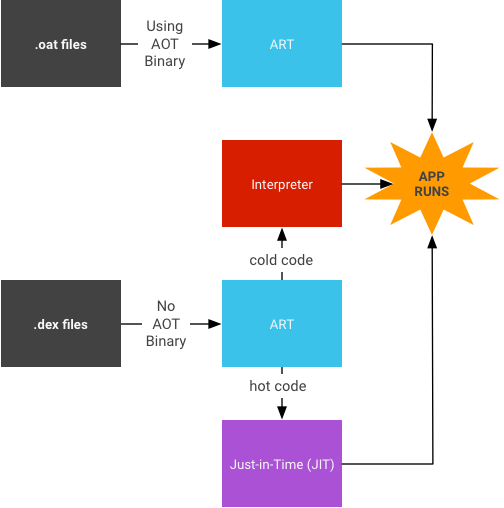
Figure: ART execution paths with and without AOT output. Source: JIT compiler and profile-guided compilation, Android Open Source Project.
The three phases of an installed app
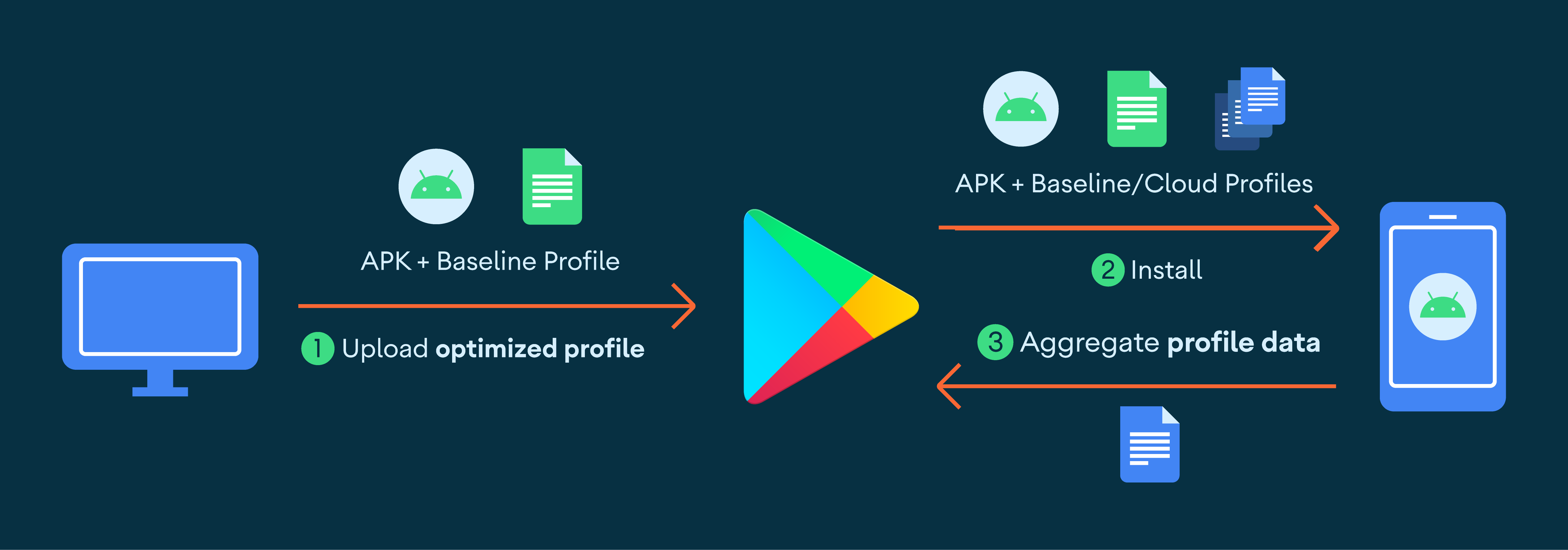
Figure: Where the cloud profile in phase 1 comes from: Play delivers the APK together with baseline and cloud profiles, and devices send aggregated usage data back. Source: Baseline profiles, Android Developers.
- At install time (cloud profiles or verification only). When an app is installed from Google Play, Play can deliver a companion
.dm(Dex Metadata) file alongside the APK. That.dmarchive contains a cloud profile collected from other devices running the same app version, listing the methods most users hit during startup and normal use.dex2oatAOT-compiles only the methods in that profile (thespeed-profilecompilation filter). If no profile is available (for example, when a tester sideloads an APK withadb install), ART performs bytecode verification only (verifyfilter) and compiles zero app methods to native code at install time. - During execution (interpreter + JIT). When the app runs, AOT-compiled methods execute directly as native machine code. Uncompiled methods start in the ART interpreter. When a method crosses a “hotness” threshold, the JIT compiler compiles it in memory and records the method in the app’s local profile under
/data/misc/profiles/cur/0/<package>/primary.prof. That JIT code lives only in RAM and disappears when the process exits. - While idle and charging (background AOT). A background job managed by ART Service merges the local runtime profile into the reference profile (
/data/misc/profiles/ref/<package>/primary.prof) and invokesdex2oatwithspeed-profileto AOT-compile the newly discovered hot methods to disk.
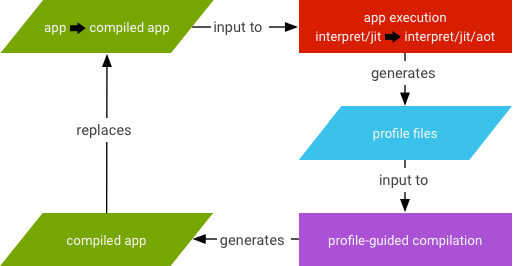
Figure: the profile-guided compilation cycle that phases 1 to 3 implement. Source: JIT compiler and profile-guided compilation, AOSP.
A freshly sideloaded test APK therefore runs almost entirely interpreted and JIT-compiled, while a week-old daily app on the same phone runs largely from AOT-compiled native code.
The files ART writes to disk
Next to the installed APK (under /data/app/~~<random>/<package>-<random>/), ART creates an oat/<abi>/ directory holding up to three files:
| File | Contents | Role and tester relevance |
|---|---|---|
base.vdex | Uncompressed DEX code plus verification metadata | Avoids re-extracting and re-verifying classes.dex on subsequent launches or recompilations |
base.odex (OAT) | An ELF shared object containing the OAT header and AOT-compiled native machine code | Holds the native instructions for compiled methods; mapped directly into the app’s address space |
base.art | Pre-initialized ART heap snapshot (classes, strings and object references referenced by the profile) | Mapped into memory at startup so the app skips initializing common classes one by one |
(Note: older documentation often uses .oat and .odex interchangeably. On modern devices, the on-disk filename for an app’s AOT output is base.odex, while the internal binary format is OAT wrapped in an ELF container.)
Why compilation state matters for testing
Static tools ignore base.odex and base.art whenever the original classes.dex is inside the APK; they read classes.dex directly. Two exceptions matter:
- Preinstalled system and OEM apps sometimes ship with their DEX code stripped from the APK and stored only in the companion
oat/<abi>/*.odexand.vdexfiles on the system or vendor partitions. To decompile those apps, you pull the.vdexor.odexfile and extract the DEX payload first. - Dynamic hooking frameworks such as Frida hook Java methods by replacing entry points on ART’s internal
ArtMethodstructures in memory. If a target method was already AOT-compiled or inlined into callers insidebase.odex, ART may have to deoptimize the method or bypass the compiled code path so the hook fires reliably.
Zygote: why no app starts from scratch
On desktop Linux, launching a program typically calls fork() followed by execve(), loading a fresh binary into a blank address space. If Android started every app that way, initializing a fresh ART runtime, loading thousands of framework classes (android.app.*, android.view.*, android.content.*), and parsing shared system resources from disk would make every cold app launch take seconds and duplicate hundreds of megabytes of identical memory across processes.
Android solves this with Zygote.
The fork-and-specialize sequence
- Boot. The
initprocess (PID 1) parsesinit.rcand startszygote64(and a separatewebview_zygotefor isolated WebView rendering processes). Zygote creates an ART VM instance and preloads common Java framework classes, native libraries (Bionic, OpenGL, ICU) and shared system resources into its own process memory, then opens a UNIX domain socket at/dev/socket/zygote64and waits. - Launch request. When
system_serverdecides an app needs a process (step 4 of the Binder walkthrough in Part 1), it sends the launch arguments (target UID, GIDs, process name, SELinux context) to Zygote over/dev/socket/zygote64. Why a raw UNIX socket instead of Binder? Because Binder relies on multithreaded thread pools, and callingfork()inside a multithreaded process that holds locks across threads can deadlock the child process. Zygote keeps its socket loop single-threaded aroundfork(). - Fork. Zygote calls
fork(), cloning its own process. Because Linux uses Copy-on-Write (CoW) memory pages, the new child process immediately sees the entire preloaded ART runtime and framework classes without copying the underlying physical RAM pages. - Specialize. The child process starts as
root(inherited from Zygote) and immediately strips its own privileges before touching any app code: it appliesseccomp-bpfsyscall filters, sets cgroups, drops Linux capabilities, callssetresgid()andsetresuid()to switch to the app’s dedicated UID (u0_aXXX), transitions into the app’s SELinux domain (such asu:r:untrusted_app:s0), and finally loads the app’s APK and entersActivityThread.main().
On devices with the USAP (Unspecialized App Process) pool enabled, Zygote pre-forks a small pool of waiting child processes ahead of time; when an app launches, a pre-forked USAP consumes the launch arguments and specializes immediately, shaving additional milliseconds off cold start.
Two security consequences of Zygote
The Zygote model creates two properties that matter in vulnerability research and dynamic testing:
- Shared ASLR layout across apps. Address Space Layout Randomization (ASLR) randomizes memory addresses when a binary is loaded via
execve(). Because every app process is forked fromzygote64without callingexecve(), every app spawned during the same boot inherits the exact same base addresses forlibc.so,libart.soand preloaded framework libraries, as well as the same stack canary value as Zygote. An information-disclosure bug in one app can therefore reveal library addresses valid inside another app or insidesystem_server(which was also forked from Zygote at boot). - Zygote is the ultimate injection point. Because every app inherits Zygote’s memory space, code injected into
zygote64ends up inside every app process launched afterward. Root modules such as Zygisk (Magisk in Zygote) use this exact mechanism to hook or hide from apps before the app’s own code executes a single instruction.
Inspecting ART and Zygote on a device
The commands below trace Zygote parentage, inspect an installed package’s compilation state, and examine the on-device .odex, .vdex and .art references on the same Pixel 9 Pro (Android 17, API level 37, SPL 2026-08-05) used in Part 1:
adb shell "ps -A -o PID,PPID,USER,NAME | grep -E 'PID|zygote|system_server|settings'"
adb shell "dumpsys package com.android.settings | grep -A 6 'Dexopt state:'"
adb shell cmd package compile -m speed-profile com.android.settings
Confirm Zygote parentage
Open the Settings app on the device so its process is running, then list the process IDs and parent process IDs (PPID):
PS C:\> adb shell "ps -A -o PID,PPID,USER,NAME | grep -E 'PID|zygote|system_server|settings'"
USER           PID  PPID NAME
root           466     1 zygote64
system         670   466 system_server
webview_zygote 1217  466 webview_zygote
system        4812   466 com.android.settings
zygote64 has PID 466 and parent 1 (init). Both system_server (670) and com.android.settings (4812) have PPID 466; both were forked directly from zygote64 rather than started via execve().
Read an app’s ART compilation state
The dumpsys package output includes a Dexopt state block generated by ART Service that records how the package’s DEX code is currently compiled for the device’s instruction set (arm64):
PS C:\> adb shell "dumpsys package com.android.settings | grep -A 6 'Dexopt state:'"
Dexopt state:
  [com.android.settings]
    path: /system_ext/priv-app/Settings/Settings.apk
      arm64: [status=speed-profile] [reason=bg-dexopt] [primary-abi]
        [location is /data/dalvik-cache/arm64/system_ext@priv-app@Settings@Settings.apk@classes.dex]
Three fields on the arm64: line tell you what ART did:
[status=speed-profile]: ART AOT-compiled only the hot methods listed in the app’s execution profile, leaving cold methods to the interpreter and JIT.[reason=bg-dexopt]: The compilation was triggered by the background idle-and-charging job after merging runtime profiles (on a freshly sideloaded APK with no profile, you will typically see[status=verify]and[reason=install]).[location is …]: The path to the compiled artifacts. For a user-installed app under/data/app/~~…/, this points to the app’s localoat/arm64/base.odexfile; for a read-only partition app updated or recompiled on device, ART stores the generated cache in/data/dalvik-cache/arm64/.
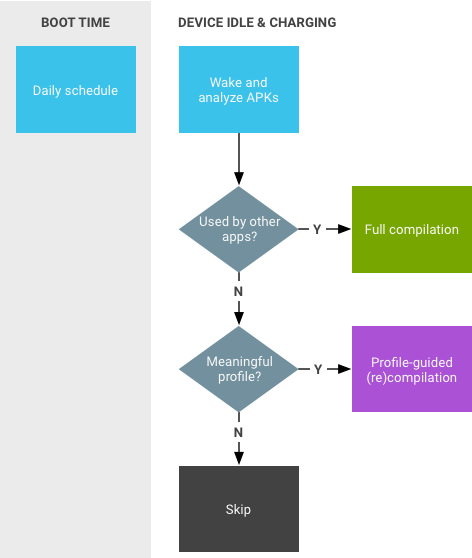
Figure: the background job behind [reason=bg-dexopt]: on device idle and charging it analyzes APKs and picks full compilation, profile-guided recompilation, or skip. Source: JIT compiler and profile-guided compilation, AOSP.
Trigger ART compilation manually
During testing you don’t have to wait for the device to sit idle and charging to see how an app behaves under different ART compilation filters. The cmd package compile command drives ART Service directly:
PS C:\> adb shell cmd package compile -m verify -f com.example.target
Success

PS C:\> adb shell cmd package compile -m speed-profile -f com.example.target
Success
Passing -m verify -f strips AOT-compiled app methods back to bytecode verification only, matching a fresh sideload; passing -m speed-profile -f forces profile-guided AOT compilation immediately from the current profile.
What to take away
Three facts connect this execution model to everything you do next with jadx, apktool and Frida:
- Android runs DEX, not
.classfiles.javacandkotlincemit.classfiles as a build-time intermediate, andd8orr8compiles them intoclasses.dex. That DEX file inside the APK is whatjadxdecompiles andapktooldisassembles to Smali. - ART is hybrid and profile-guided. Full install-time AOT ended in Android 6.0. Modern ART combines interpretation, in-memory JIT and profile-guided AOT (
.vdex,.odexand.art), and updates itself as a Mainline APEX module. - Every app is a specialized clone of Zygote.
system_serverrequests a process over a UNIX socket,zygote64callsfork(), and the child drops privileges into its own UID and SELinux domain before loading the APK, sharing preloaded framework memory (and its ASLR layout) across every app since boot.
Sources: Configure ART (source.android.com) · Android runtime and Dalvik overview · JIT compiler and profile-guided compilation · ART Service configuration · DEX format · Shrink, obfuscate, and optimize with R8 · Overview of memory management and Zygote · MASTG 0x05a - Android Platform Overview