Part 1 of the series Android Fundamentals for Security Testers. A condensed overview of the security model lives in Introduction to Android Security; this series goes deeper, one part at a time.
The fastest way to be wrong about Android is to treat it as one product with one owner and one version. It is none of those things, and the difference changes how you read a CVE, which devices you test, and what you write in a report.
By the end of this post, you should be able to answer three questions about any Android bug: who owns the code, which versions it affects, and which layer it lives in.
Three products, and one thing that blurs them
| Layer | Owner | Updated through | The question a tester asks |
|---|---|---|---|
| AOSP | Google (open source) | OS releases and monthly bulletins; OEMs merge the fixes | Is the bug in code every device shares? |
| Mainline modules | AOSP code, packaged separately | Google Play system updates (or a partner OTA) | Which module version is installed? |
| GMS | Google (proprietary, licensed) | Play Store and Play Services updates | Does this hit every licensed device? |
| OEM layer | Samsung, Xiaomi and others | The vendor’s own pipeline | Is this device-specific, and how far behind is the vendor? |
AOSP is the Android Open Source Project, led by Google (source.android.com): the Linux kernel, the ART runtime, the framework and the stock apps. Anyone can build a working phone OS from it, which is why LineageOS exists. Since 2026 Google publishes the AOSP source in two drops a year (Q2 and Q4), which matters when you try to match a binary on a device to public source.
Mainline blurs the picture. Introduced in Android 10, it packages selected system components as modules (ART, Conscrypt, the media codecs, the DNS resolver, Wi-Fi and PermissionController are among them) in either APEX or APK format. Modules update outside the normal OS release cycle, through Google Play system updates or a partner OTA. They are AOSP code delivered through Google’s update infrastructure, so two devices with the same patch level can run different module versions.
GMS (Google Mobile Services) is the proprietary part Google licenses to device makers: the Play Store, Play Services and the core Google apps. Play Services updates through the Play Store on its own schedule, separate from OS updates.
The OEM layer is Samsung, Xiaomi and everyone else. They build on AOSP, license GMS, and add their own skin, preinstalled apps and services. For testers that means two things: OEM code is extra attack surface that almost nobody outside the vendor audits, and the OEM’s update pipeline decides how far behind a device’s patches sit.
Ask one question of every vulnerability write-up: did the bug live in AOSP code (shared everywhere), in a Mainline module, in GMS (every licensed device) or in OEM code (one vendor’s devices)? The same bug has four very different exposure models.
“Version” is three separate things
Ask someone for a device’s Android version and you get one number. A tester needs three.
1. The release (API level). Android 17 is API level 37 and reached stable in June 2026. Since Android 16, releases also carry minor SDK versions (37.1, 37.2), and Pixels receive quarterly platform releases, which is why bulletins say things like “16-qpr2”. The release tells you whether a bug can exist on a device: every bulletin entry lists the AOSP versions it affects, and the November 2026 table runs from Android 14 to 17.
2. The security patch level (SPL). This is the monthly string from the Android Security Bulletin, readable in Settings and as the system property ro.build.version.security_patch. The manufacturer sets it, so it is a declaration, not proof. Each bulletin has two levels, YYYY-MM-01 and YYYY-MM-05, and only -05 or later covers everything in that month’s bulletin. In November 2026, according to coverage of the bulletin, the first level held Framework, System and ART fixes and the second held kernel and chipset-vendor fixes. A device on 2026-11-01 is not fully patched for November.
3. Mainline module versions. Modules update independently of the OS and of the SPL. You can list them with pm list packages --apex-only --show-versioncode.
The rule: whether a bug applies depends on the release. Whether it is fixed depends on the patch level (and the module version, for module bugs). “We run Android 13, so this CVE doesn’t affect us” is only meaningful if the bulletin says so. Recent bulletins list only Android 14 and later, so an older version’s absence from the table means not covered, not not affected.
Pin every claim in a report to the release or API level, the SPL string, the device model, and module versions where they matter.
The stack, layer by layer
Android’s developer documentation draws five layers: system apps, the Java API framework, native libraries plus the runtime, the HAL, and the Linux kernel. AOSP’s own architecture page uses slightly different vocabulary: privileged apps, the framework, system services, native daemons. Read both. The first gives you the shape, and the second tells you what actually runs where.
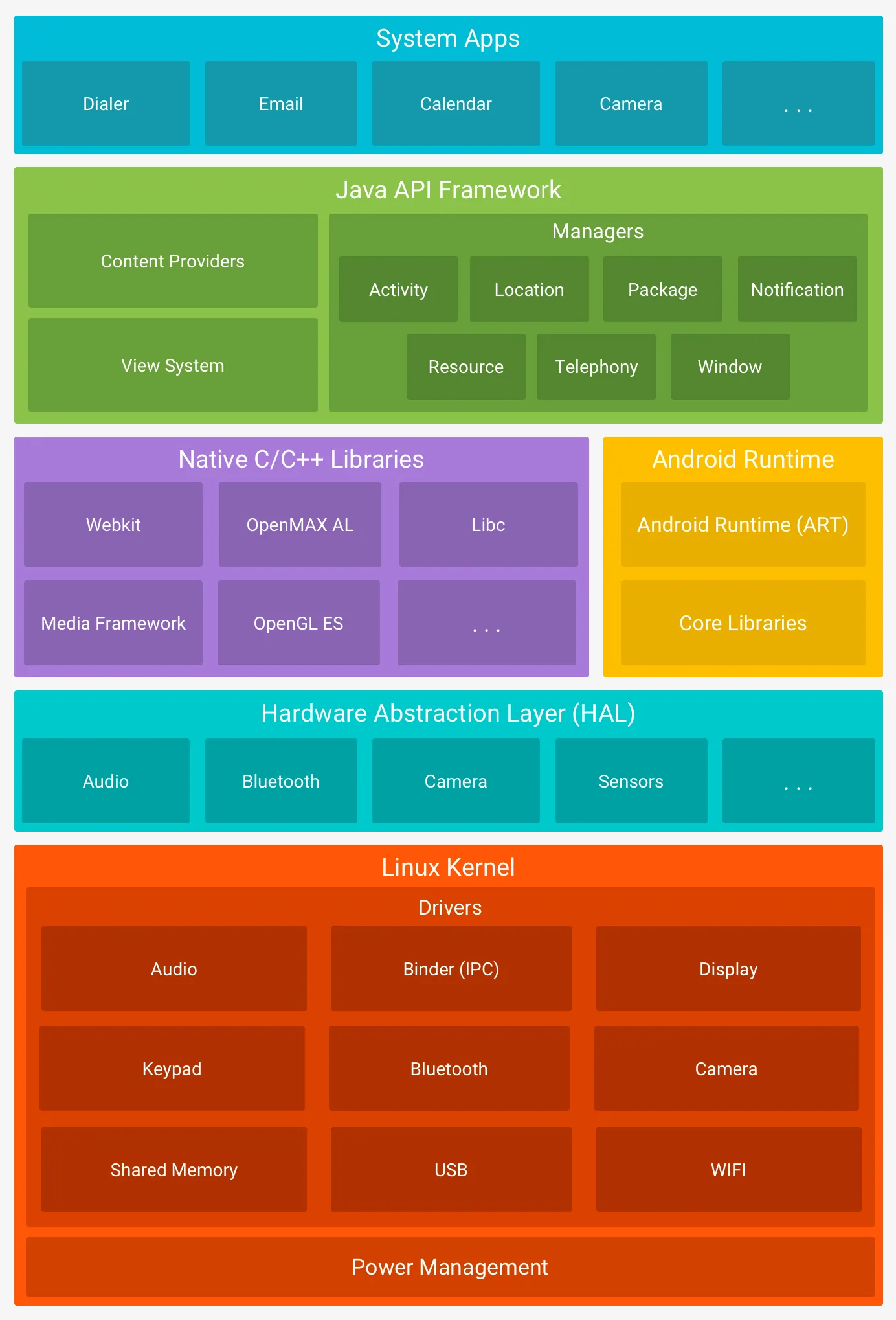
Figure: The Android software stack. Source: Platform architecture, Android Developers.
| Layer | What lives there | A tester’s note |
|---|---|---|
| Apps | User apps, system apps, privileged apps | Preinstalled apps can hold far more power than store apps |
| Java API framework | The classes your app calls | Runs inside the app’s process and talks to system services elsewhere |
| Native libraries + ART | Bionic, the media stack, the runtime | Memory-corruption bugs and DEX behaviour live here |
| HAL | Vendor implementations of hardware interfaces | Owned by the SoC/OEM and patched separately |
| Linux kernel | Binder driver, drivers, enforcement | A kernel bug undermines everything above |
Apps
AOSP separates three kinds of app. Ordinary apps use only the public API. Privileged apps also use system APIs and must be preinstalled. Device manufacturer apps can reach unstable framework internals and update only with the system software. The takeaway: preinstalled does not mean harmless. The further an app sits from the Play Store, the more power it may hold and the less scrutiny it gets.
On a device, their install paths tell you their tier before you ever decompile them: user-installed apps live under /data/app, ordinary system apps live in app/ directories on the read-only partitions (/system/app, /product/app, /vendor/app), and privileged apps sit in priv-app/ directories (/system/priv-app, /product/priv-app, /system_ext/priv-app) with their granted signature|privileged permissions explicitly allowlisted in XML files under etc/permissions/privapp-permissions-*.xml.
Java API framework, and where it actually runs
The framework is the API surface every app codes against: ActivityManager, PackageManager, the View system, notifications. The detail that trips people up is that framework code runs inside the app’s own process. These classes are mostly the client side of a conversation.
The server side lives in system services, in other processes. system_server hosts most of the Java ones (activity and window management, package management, notifications), while others, such as SurfaceFlinger and the media services, run as separate native processes.
Framework is the part inside your app. System services are the part that decides.
Native libraries and ART
Below the framework sit native libraries, including Android’s libc, Bionic (not glibc), and the media stack. Native parsers have historically been a rich source of memory-corruption bugs. When Java or Kotlin code inside an app or the framework needs to call into these C/C++ libraries within the same process, it crosses the JNI (Java Native Interface) boundary.
Then comes ART, the runtime for every app since Android 5.0 (API 21); Dalvik came before. Your Java or Kotlin compiles to bytecode, and the d8 tool converts that to DEX. ART does not simply interpret it. Since Android 7 it combines AOT compilation, JIT compilation and interpretation, with AOT guided by profiles. On Pixels the flow looks like this:
- Play ships a cloud profile with the install, and ART AOT-compiles the methods it lists. With no profile, there is no install-time AOT.
- Early runs interpret the code. Hot methods get JIT-compiled while ART records a local profile.
- When the phone is idle and charging, a background job recompiles using the combined profile.
The output is a set of cache files (typically
.vdex,.odexand optionally.art). Since Android 14, on-device compilation is handled by ART Service, and ART itself is a Mainline module.
For a tester: the DEX inside the APK is the ground truth. The compiled artifacts on a device are caches that differ by device and change over time.
HAL, partitions and the vendor boundary
The hardware abstraction layer is a standard interface that hardware vendors implement, so the framework doesn’t care which camera or modem sits underneath. Newer HALs use AIDL, and HIDL is deprecated.
Storage is split into partitions: /system for the OS, /data for apps and user data, and others such as /vendor, /product and /odm. Since Project Treble (Android 8, API 26), vendor-specific hardware code lives in /vendor, so framework updates don’t have to touch the vendor’s blobs.
For a tester, a bug in system code and a bug in vendor code are different attack surfaces with different owners and patch routes. It also explains why the second monthly patch level exists: partners can ship the fixes common to all devices first, and the rest when they are ready.
Linux kernel
At the bottom sits a modified Linux kernel with Android-specific parts, most importantly the Binder driver. Recent Android kernels are built around the Generic Kernel Image (GKI), a common kernel plus vendor modules, and AOSP publishes GKI builds with names like android17-6.18.
One detail that dates older articles: the in-kernel low-memory killer was removed from the upstream kernel in 4.12, and a userspace daemon, lmkd, now decides which processes to kill under memory pressure.
The kernel matters for security because it enforces the sandbox. A kernel bug can undermine every layer above it.
Who decides? Binder and system services
Everything above comes together in one sentence worth remembering: apps ask, system services decide, and Binder tells the service who asked.
Take app A starting an activity in app B:
- A’s framework code, running inside A’s process, sends a Binder transaction to the activity manager in
system_server(ActivityTaskManagerService; activity management lived in ActivityManagerService before Android 10). - The Binder driver delivers it and stamps the transaction with the caller’s UID and PID. The caller cannot forge them.
- The service reads that identity (via
Binder.getCallingUid()andBinder.getCallingPid()) and decides: does the component exist, is it exported, does the caller hold the required permission? - If the call is allowed,
system_serverasks B’s process to create the component, starting it from Zygote if it isn’t running.
Two refinements. First, Binder is the main channel, not the only one. Files, sockets and shared memory also exist, and once two apps are connected (for example through a bound service), calls flow between them through the Binder driver without system_server in every call.
Second, the kernel supplies the identity, but the service enforces the rule. A service that forgets to check, checks the wrong thing, or calls Binder.clearCallingIdentity() too early so downstream checks see the service’s own privileged UID instead of the caller’s, can be tricked into acting for an app that has no right to ask. That is the confused-deputy problem, and later parts of this series come back to it.
When an action has to reach actual hardware (say, taking a photo or reading a fingerprint), the chain continues all the way down the stack: the app talks to a system service over Binder, the system service talks to the vendor’s HAL process over an AIDL (or legacy HIDL) Binder interface, and the HAL talks to the Linux kernel driver through system calls and ioctl operations on device nodes (/dev/*). An ordinary app cannot open those hardware device nodes directly; the kernel and SELinux block it.
Why this picture matters before you touch a tool
OWASP’s Mobile Application Security Testing Guide (MASTG 0x05a) groups these controls across the stack into four defense-in-depth domains:
- System-wide security - Verified Boot, disk encryption and hardware-backed key storage (the bottom of the stack: bootloader, kernel, TEE and partitions).
- Software isolation - each app runs in its own Linux UID sandbox under strict SELinux mandatory access control (kernel and runtime enforcement).
- Network security - TLS defaults, Network Security Configuration and certificate stores (framework and Conscrypt Mainline module).
- Anti-exploitation - compiler mitigations, memory-safe languages in AOSP and process compartmentalization such as
webview_zygote(native libraries, HAL and kernel).
A tester who knows the layers knows where a finding lives, which of those four barriers it bypasses, and which control group of the OWASP MASVS it belongs to.
Everything else in the series sits on this stack. The manifest declares components (the app layer). Permission checks run in system services. Your tooling reaches the device through adb, which talks to the adbd daemon on the device (itself a Mainline module), and commands such as am and pm then reach system services over Binder. And “is this device patched?” is answered by a patch level, not a version number.
Peek under the hood: A five-minute tour of your device
If you have a device handy with USB debugging enabled, you can see these layers for yourself. Open a terminal on your host computer and run these commands to inspect your own build fingerprint, system version, and installed modules:
adb shell getprop ro.build.version.release                  # Android version
adb shell getprop ro.build.version.sdk                      # Major API level
adb shell getprop ro.build.version.sdk_full                 # Major.minor API level (Android 16+)
adb shell getprop ro.build.version.security_patch           # SPL
adb shell getprop ro.build.fingerprint                      # Build identity + build type
adb shell pm list packages --apex-only --show-versioncode   # Mainline APEX modules
adb shell "ps -A | grep -E 'system_server|zygote|surfaceflinger|lmkd'"
adb shell "service list | head -n 20"                       # Binder services
The outputs below are from a Pixel running Android 17. Yours will look different, which is the point: every device is its own unique combination of Android version, patch level, and Mainline module ecosystem.
Release, API level and patch level
PS C:\> adb shell getprop ro.build.version.release
17

PS C:\> adb shell getprop ro.build.version.sdk
37

PS C:\> adb shell getprop ro.build.version.sdk_full
37.0

PS C:\> adb shell getprop ro.build.version.security_patch
2026-08-05

PS C:\> adb shell getprop ro.build.fingerprint
google/akita/akita:17/AP3A.260805.001/1234567:user/release-keys
The device reports Android 17 and API level 37. The Android release and API level answer “which framework generation is this?”; the SPL, 2026-08-05, answers “which security update level is declared?” The fingerprint confirms the device is running a user/release-keys build (a production device).
This device is a live example of the rule above. A level of 2026-08-05 covers everything in the August 2026 bulletin, but as of 19 November 2026 it is missing the September, October and November bulletins. An inventory should flag exactly that gap.
Inspect Mainline modules
The next command asks the package manager for APEX modules rather than ordinary applications. Note that --apex-only lists only modules packaged as APEX containers (such as ART, Conscrypt and the DNS resolver); Mainline components delivered as ordinary APKs (such as PermissionController or MediaProvider) appear in standard pm list packages output instead.
PS C:\> adb shell pm list packages --apex-only --show-versioncode
package:com.google.android.art versionCode:370546200
package:com.google.android.conscrypt versionCode:370546200
package:com.google.android.resolv versionCode:370546200
package:com.google.android.tzdata6 versionCode:370546200
package:com.android.virt versionCode:370399999
package:com.android.apex.cts.shim versionCode:1
package:com.google.android.widevine.nonupdatable versionCode:190260313
package:com.android.hardware.vibrator versionCode:1
One naming detail: Google-built modules typically use package names beginning with com.google.android, while AOSP’s documentation and source builds use com.android (for example com.android.art). When you compare a device against the AOSP module table, match by function and not by the exact prefix.
Trace the core processes
The process view makes the running system components visible:
PS C:\> adb shell "ps -A | grep -E 'system_server|zygote|surfaceflinger|lmkd'"
lmkd           304     1   10798356   4516 0                   0 S lmkd
root           466     1   15246304 199660 0                   0 S zygote64
system         523     1   10905000  42084 0                   0 S surfaceflinger
system         670   466   18829508 495088 0                   0 S system_server
webview_zygote 1217  466   42383260  90732 0                   0 S webview_zygote
In this output, Zygote is the app and system-process launcher, system_server owns framework services, SurfaceFlinger manages graphics composition, and lmkd applies memory-pressure policies. The separate webview_zygote process illustrates process isolation for WebView content.
Inventory Binder services
The final command returns the first 20 entries from the registered Binder service list:
PS C:\> adb shell "service list | head -n 20"
Found 325 services:
0       DockObserver: []
1       SurfaceFlinger: [android.ui.ISurfaceComposer]
2       SurfaceFlingerAIDL: [android.gui.ISurfaceComposer]
3       accessibility: [android.view.accessibility.IAccessibilityManager]
4       account: [android.accounts.IAccountManager]
5       activity: [android.app.IActivityManager]
6       activity_structured: [android.app.IActivityManagerStructured]
7       activity_task: [android.app.IActivityTaskManager]
8       adb: [android.debug.IAdbManager]
9       adservices_manager: [android.app.adservices.IAdServicesManager]
10      advanced_protection: [android.security.advancedprotection.IAdvancedProtectionService]
11      alarm: [android.app.IAlarmManager]
12      allowlist: [android.os.allowlist.IAllowlistService]
The list contained 325 registered services. Names such as activity, activity_task, account, alarm, and adb show which framework managers are registered through Binder. Seeing a service name is useful as an inventory step, not as evidence of an implementation detail or a vulnerability.
Notice that both activity (IActivityManager) and activity_task (IActivityTaskManager) are registered. That is the split described earlier: activity handling moved out of the activity manager into its own task manager service.
What to take away
Three habits carry through the rest of this series:
- Ask which layer a bug lives in. AOSP, a Mainline module, GMS or the OEM layer: each has a different owner, exposure and patch route.
- Treat “version” as three numbers. The release says whether a bug can exist, the patch level says whether it was fixed (and only
-05covers the whole month), and module versions fill in the gaps. - Remember who decides. Apps ask, system services decide, and Binder tells the service who asked. Most of the security-relevant behaviour in the next parts is a variation on that sentence.
That layer map is what turns a finding into a report: it tells you which barrier the bug bypasses and which control group of the OWASP MASVS it belongs to. In Part 2 we open an APK and follow what ART actually runs.
Check yourself
- A device reports Android 17 and an SPL of
2026-11-01. Is it fully patched for November 2026? Why or why not? - Where does the framework code your app calls actually run, and where are access decisions made?
- Two devices have the same SPL but different security postures. Give two possible reasons.
- Who stamps the caller’s identity on a Binder transaction, and who enforces the rule?
Sources: Platform architecture (developer.android.com) · AOSP architecture overview · Configure ART · Mainline modular system components · APEX format · Low memory killer daemon · Android Security Bulletins · MASTG 0x05a